
tool
Coming to Pocket Orbit
PDF material in your Pocket Orbit workspace
Turn PDF material into a working note. Keep the Markdown, page images and unchanged original together.
Your local workspace. Your own files. Availability →
Written and reviewed by the Pocket Orbit Product TeamUpdated October 18, 2026
Check the text. Keep the pages and original PDF.
Illustrated app workflow · example contentSource, correction and a working note
Browser tool and Mac interface with an authored teaching example.
Pocket Orbit01 / 05
01
Choose text or a source-preserving package
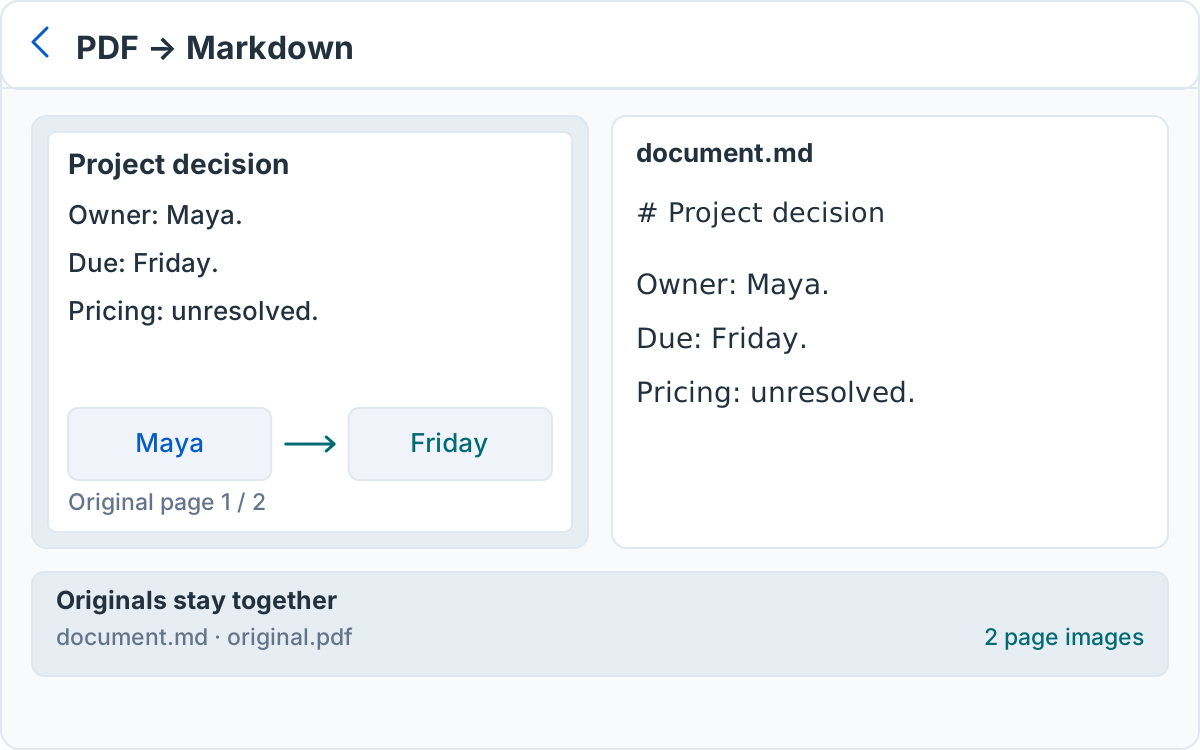
Use PDF to text for words and source-page labels. Use PDF to Markdown for a portable package with page images and the unchanged PDF. Both browser tools connect to your native Mac workspace.
02
A PDF is a source, not a finished note
A project handout may mix readable text, diagrams and uncertain scan recognition. Keep a source-linked working note, correct its text and organize it with your other notes instead of discarding the original.
03
Try the same material in the browser first
Open the PDF converter, choose pages and inspect the original-page previews.
Workflow and details
Open the PDF converter, choose pages and inspect the original-page previews. Correct the editable Markdown. Download Markdown + originals: the ZIP keeps document.md, the unchanged PDF, page PNGs and import-manifest.json. This produces a portable result without an account.
04
Continue in the app
Use Import Markdown… and select the conversion ZIP or a PDF in the Mac app.
Workflow and details
Use Import Markdown… and select the conversion ZIP or a PDF in the Mac app. A PDF opens page, password and OCR choices, then a text review before import. The checked package becomes one working note with page sections and relative attachments. Import the result into your Mac workspace.
05
Choose it for recurring work
Suitable for revisiting source material, correcting extracted notes, collecting project evidence and running a separately qualified selected-note task.
Workflow and details
Suitable for revisiting source material, correcting extracted notes, collecting project evidence and running a separately qualified selected-note task. Use a dedicated PDF editor for editing forms, signatures or the original page layout; a citation manager for bibliographies; and a handwriting workflow for genuine editable Pencil strokes.
06
Requirements and limits
Mac workspace access requires Pro. Proposed €14.99/month or €144.99/year and an eligible seven-day trial remain storefront-gated. Browser conversion remains useful without purchase. Local parsing/OCR engines differ across platforms. Complex equations, multi-column reading order and tables require original-page review; no perfect reconstruction is promised.
07
Your next checkable task
Use the PDF exercise, inspect its portable links, and import into a copied workspace.
Workflow and details
Use the PDF exercise, inspect its portable links, and import into a copied workspace. Reopen the Markdown and attachments outside Pocket Orbit. Only use local AI after its device, model and task requirements are met, then check names, dates, negation and uncertainty against the original.
08
Check the Pro offer.
Mobile + Mac Pro includes your Mac workspace. Compare billing periods and trial eligibility on the pricing page; confirm your regional price in the app.
Sources and editorial review
Written and reviewed by the Pocket Orbit Product Team · Updated October 18, 2026
Editorial trustSources, method, and update policy
Product claims are checked against the current app. Competitor claims use dated official sources. Corrections can be sent to alpaca-labs.dev@proton.me.
Continue with a checkable task
Keep originals, review the result and check platform requirements before continuing.
Keep going
Related evidence and next steps
Try one small, checkable workflow
Start with the sample workspace and check the requirements for your Mac.