
research
A practical walkthrough
Summarize a project decision without losing commitments
A shorter note must keep the same meaning. Check owners, dates and open questions against the source.
Your local workspace. Your own files. Availability →
Written and reviewed by the Pocket Orbit Product TeamUpdated October 18, 2026
Keep the owner, deadline and open question.
Illustrated app workflow · example contentPractical workflow
The process, step by step
- 1Prerequisites
- 2Open the source before summarizing
- 3Use the supported Summary action
- 4Review owner, deadline and uncertainty
The Pocket Orbit workflow
Pocket Orbit01 / 05
01
Prerequisites
Keep an untouched copy of the project note set. For an app-generated result, finish Processing setup on a qualified device and have valid platform access. You can complete the source-review exercise manually when the task is unavailable.
02
Open the source before summarizing
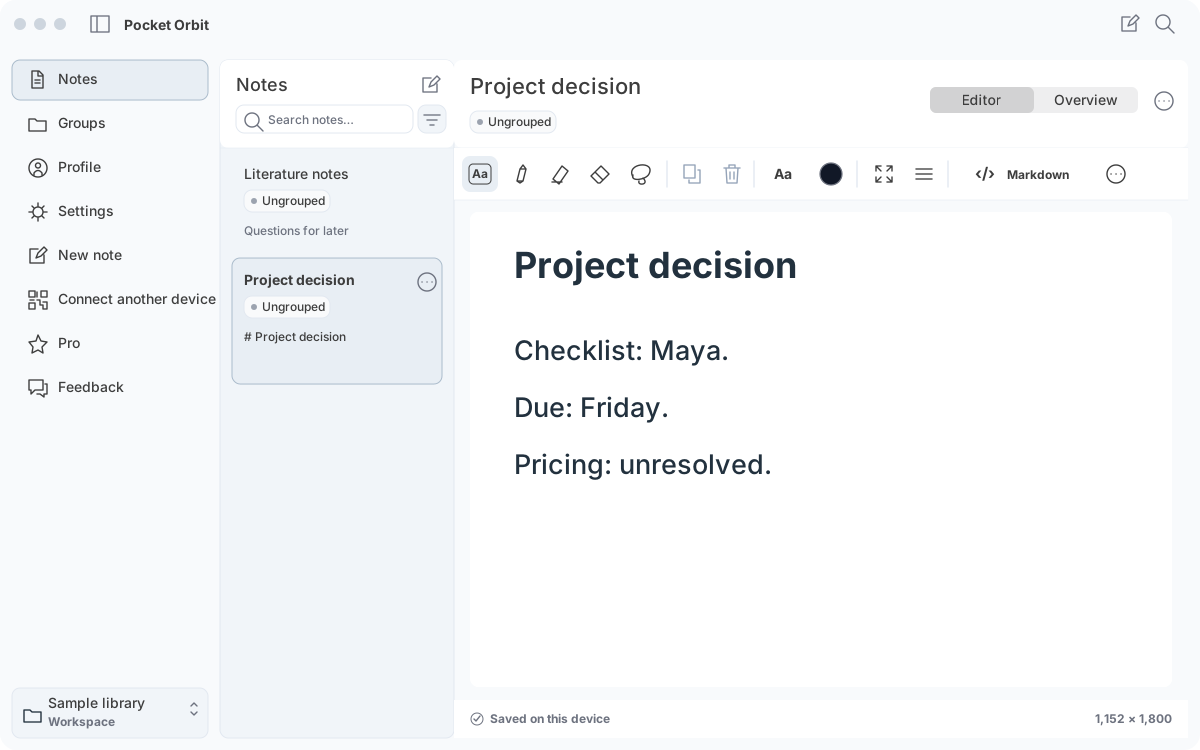
Open Project decision in Notes. Read the original: Maya owns the release checklist; it is due Friday; pricing remains unresolved. Inspect Markdown → Read. Keep these three facts visible as your review rubric.
03
Use the supported Summary action
Open Overview → Summary and use the available Generate summary action. Wait for completion or read the unavailable state. The website animation supplies a teaching result; it does not run inference or promise the same output on your device.
04
Review owner, deadline and uncertainty
Compare each statement against the source. A useful shorter version keeps Maya, Friday and the unresolved price decision. Reject invented approvals, dates or commitments. Shorter text is not a reason to lose an open question.
05
Keep, correct or discard
Correct a weak result against the original or discard it. Keep the source note and reopen it to verify preservation. If the source has changed, treat the saved summary as potentially outdated and review again.
06
Summarize Markdown notes without an upload: check the boundary
A local task is a processing choice, not a promise that the app never connects to the network.
Workflow and details
A local task is a processing choice, not a promise that the app never connects to the network. Complete the supported setup first. Model downloads, purchase checks and other documented services have separate network behavior. Read the network guide before using material whose handling matters to you.
For this exercise, inspect Project decision in Markdown → Read before generating a summary. Compare the result against Maya, Friday and the unresolved pricing question. The supplied teaching result is synthetic; it is a review example, not measured model performance.
07
A result you can check without an AI task
Write your own one-sentence summary from the source, then mark each commitment as supported, missing, contradicted or unclear. Keep uncertainty explicit. This review method still works when the model is unavailable or the device has not qualified.
Repeat the exercise after changing the source deadline in a copy. The old result should now fail your date check. Keep the source and update or discard the stale summary rather than treating saved output as automatically current.
08
A useful counterexample
Source: Maya owns the checklist. Due Friday. Pricing remains unresolved. A fluent output saying pricing is approved, changing Maya to another owner or omitting the unresolved question fails review. Mark each source fact as retained, altered or omitted; reject an invented commitment before keeping the result. This is an authored review exercise, not measured model output.
Sources and editorial review
Written and reviewed by the Pocket Orbit Product Team · Updated October 18, 2026
Editorial trustSources, method, and update policy
Product claims are checked against the current app. Competitor claims use dated official sources. Corrections can be sent to alpaca-labs.dev@proton.me.
Keep going
Related evidence and next steps
Try one small, checkable workflow
Start with the sample workspace and check the requirements for your Mac.