
Pocket Orbit for Mac
Local notes for Mac
Markdown notes, source material and local AI, together on your Mac. Your private workspace.
Your local workspace. Your own files. Availability →
Your notes, in your workspace.
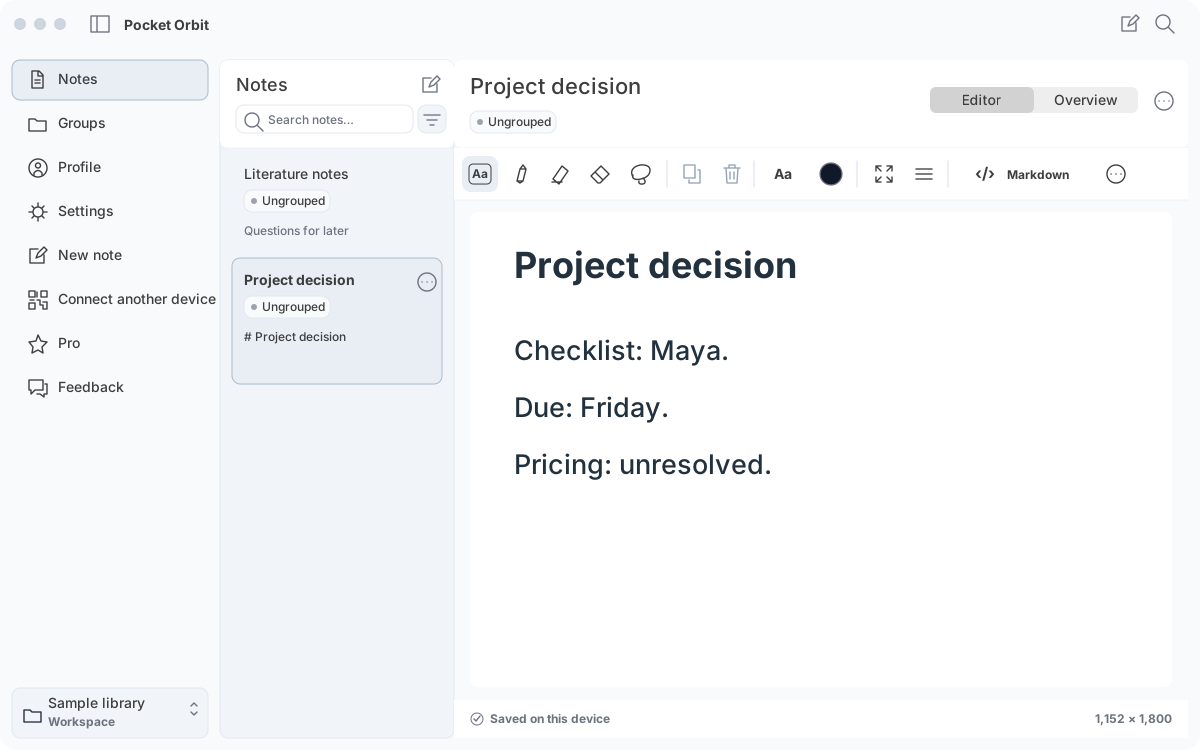
App interface with example contentThe Pocket Orbit workflow
Room to think, without a workspace to maintain.
A native Mac workspace brings your library, groups and selected note into a clear hierarchy.
Workflow and details
A native Mac workspace brings your library, groups and selected note into a clear hierarchy. Search for the source you need, keep the document readable and open supporting material when it helps.
The goal is a calm daily writing tool: keyboard navigation, contextual formatting and recoverable edits, rather than a dashboard full of things to configure.
The editor and the file tell the same story.
Headings, body text, lists and emphasis belong to Markdown.
Workflow and details
Headings, body text, lists and emphasis belong to Markdown. Editing the text and changing its supported formatting on the canvas should describe the same document. Handwriting and positioned layout stay in companion data alongside the readable file.
A Markdown heading is a heading, not an arbitrary font size. Fonts and page layout can remain part of the canvas without pretending that every visual choice is portable Markdown.
Keep the thinking close to the source.
Local AI is there to help shorten a note, suggest a group or bring several related notes into one reviewable summary.
Workflow and details
Local AI is there to help shorten a note, suggest a group or bring several related notes into one reviewable summary. It should leave the source available so you can check names, numbers, uncertainty and disagreements.
Local processing depends on the installed model and device capacity. A private workflow still needs a careful review; running on your Mac does not make an answer automatically correct.
Pencil on iPad. Keyboard on Mac. A note on iPhone.
Use the device that suits the moment. Capture handwriting and diagrams on iPad, continue structured writing on Mac and carry the material on iPhone.
Workflow and details
Use the device that suits the moment. Capture handwriting and diagrams on iPad, continue structured writing on Mac and carry the material on iPhone.
Folder-based storage and optional device connections are separate choices. An iCloud folder, a nearby connection and local editing have different network and recovery requirements.
Mac belongs to Pro.
Mac requires Mobile + Mac Pro, offered monthly or annually.
Workflow and details
Mac requires Mobile + Mac Pro, offered monthly or annually. On iPhone and iPad, Free, Mobile Pro and Mobile + Mac Pro are the selected scopes, with paid weekly or annual choices. Mobile Pro alone does not unlock the Mac workspace. Trial access is offered only when the store confirms an eligible introductory offer.
Install Pocket Orbit for Mac from the download page. Open a workspace, choose your local models and start with your own notes.
Requirements and limitations
Mac access is included with Mobile + Mac Pro. Choose a supported local model for your device and keep a separate backup of your workspace.
Check the Pro offer.
Mobile + Mac Pro includes your Mac workspace. Compare billing periods and trial eligibility on the pricing page; confirm your regional price in the app.
Best for
- + Your own notes and checkable tasks
- + Markdown files on a supported device
Not designed for
- - Automatic retrieval across an entire workspace
- - Unreviewed results or universal plugin compatibility
Sources and editorial review
Written and reviewed by the Pocket Orbit Product Team · Updated October 18, 2026
Editorial trustSources, method, and update policy
Product claims are checked against the current app. Competitor claims use dated official sources. Corrections can be sent to alpaca-labs.dev@proton.me.
Continue this workflow
Try one small, checkable workflow
Start with the sample workspace and check the requirements for your Mac.