
Pocket Orbit for Mac
Markdown editor for your local notes
Edit readable Markdown beside the note you see. Keep text, original ink and attachments distinct.
Your local workspace. Your own files. Availability →
The note and its Markdown, together.
App interface with example contentThe Pocket Orbit workflow
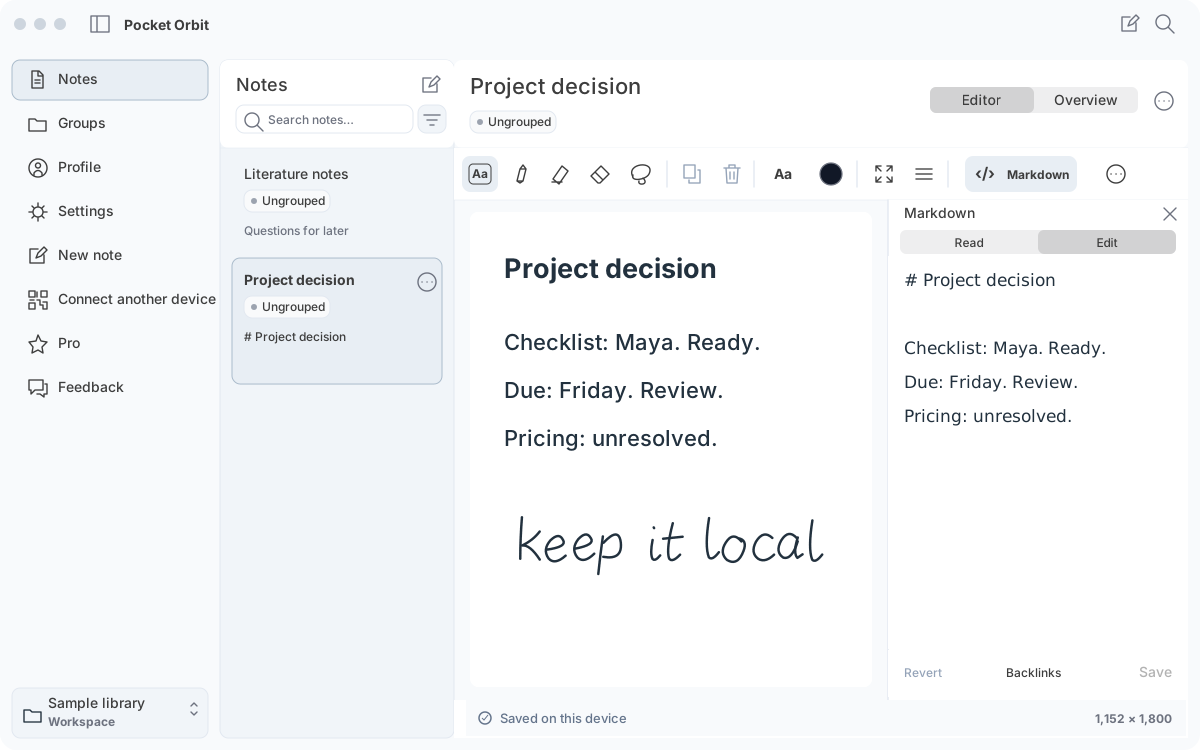
One note, two views
Use the Markdown panel to read or edit the source. Keep headings, lists and links visible instead of assuming the canvas preserves every extension.
Try a reversible change
Open a copy of the sample project note. In Markdown, select Edit, change one heading, choose Save, and reopen it. Compare the file in another editor.
Use local AI and keep the source in view
For a qualified local AI summary task, start with a copy of one Markdown note.
Workflow and details
For a qualified local AI summary task, start with a copy of one Markdown note. Compare the shorter result with its source before keeping it: the owner, date and unresolved question should still mean the same thing.
Local processing requires setup and a supported device and model. The project exercise includes a human-written reference so you can practise the review before running a task.
Where the boundary sits
Markdown text and native companion files serve different purposes. Test drawings, embeds and plugin syntax separately. A successful text edit is not proof of complete Obsidian compatibility.
Requirements and limitations
Mac access is included with Mobile + Mac Pro. Choose a supported local model for your device and keep a separate backup of your workspace.
Markdown with handwriting: text and strokes have different homes
A sketch can preserve an arrow or relationship that a sentence loses.
Workflow and details
A sketch can preserve an arrow or relationship that a sentence loses. Keep that original ink in its native note and companion files, while giving the corrected explanation headings and lists in Markdown. An exported image is a view of the sketch, not the editable strokes.
Capture with Pencil on a supported iPad, then use the Mac workflow to inspect and continue your notes. Try the handwriting-to-Markdown exercise before trusting the same material in another editor.
Check the Pro offer.
Mobile + Mac Pro includes your Mac workspace. Compare billing periods and trial eligibility on the pricing page; confirm your regional price in the app.
Best for
- + Your own notes and checkable tasks
- + Markdown files on a supported device
Not designed for
- - Automatic retrieval across an entire workspace
- - Unreviewed results or universal plugin compatibility
Sources and editorial review
Written and reviewed by the Pocket Orbit Product Team · Updated October 18, 2026
Editorial trustSources, method, and update policy
Product claims are checked against the current app. Competitor claims use dated official sources. Corrections can be sent to alpaca-labs.dev@proton.me.
Continue this workflow
Try one small, checkable workflow
Start with the sample workspace and check the requirements for your Mac.