
Coming to Pocket Orbit
Markdown and companion files
Understand which material belongs to the text file and which needs its companion.
Your local workspace. Your own files. Availability →
The Pocket Orbit workflow
Which version does this guide describe?
Follow this guide in your Pocket Orbit workspace. You can also open the sample material in an ordinary Markdown editor.
Keep text and drawing files together
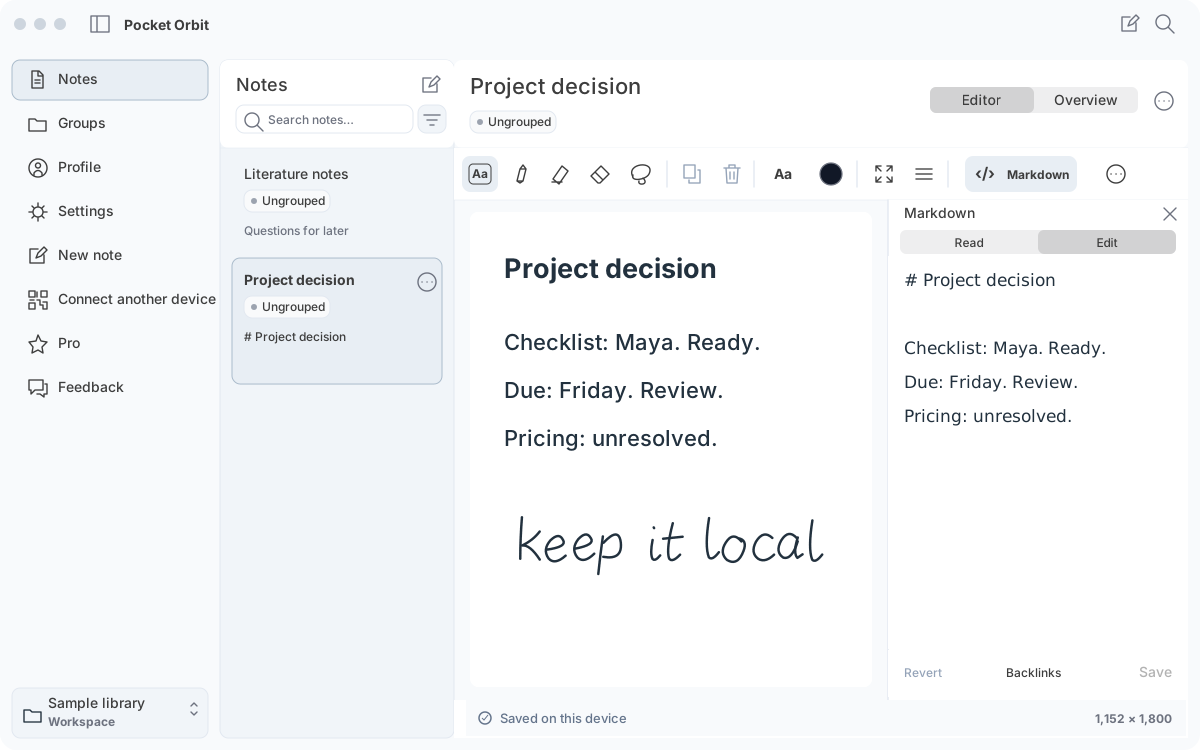
Markdown contains readable text, links and generated summaries. Editable native ink has a separate companion representation. A rendered ink preview and its editable source serve different purposes; preserving the preview alone does not preserve editability.
Respect the source markers
Open Markdown → Edit to inspect the source. Keep textbox markers, Pocket Orbit properties, front matter, ink previews and generated summary structure intact. The native source editor warns when changes cannot be safely saved. Invalid edits remain a draft rather than a certified conversion.
Back up the complete folder
Keep the Markdown, genuine companion files and referenced attachments together, with their relative paths. Do not rename or edit internal companion formats as a shortcut. Folder sync and external editors need their own compatibility checks.
Run a reversible test
Make a copy of an app-generated note containing ink and text. Reopen it in Pocket Orbit and in a plain Markdown editor. Check text visibility, preview visibility and ink editability separately. The downloadable plain-text sample has an ordinary SVG, not fabricated native ink data.
Sources and editorial review
Written and reviewed by the Pocket Orbit Product Team · Updated October 18, 2026
Editorial trustSources, method, and update policy
Product claims are checked against the current app. Competitor claims use dated official sources. Corrections can be sent to alpaca-labs.dev@proton.me.
Try one small, checkable workflow
Start with the sample workspace and check the requirements for your Mac.