
AI study notes on iPad

Your notes in. A study-ready summary out.

Start with notes you typed, scanned, or drew, review the source, and use AI to create a shorter version for revision.

Best for

  • + Lecture and class notes
  • + Mixed handwritten and typed inputs
  • + Reviewing a shorter summary

Not designed for

  • - Automatic meeting recording
  • - Unattended transcription
  • - Replacing source verification
Practical workflow

The process, step by step

  1. 1Capture the original note with Type, Scan, or Draw.
  2. 2Review the source content.
  3. 3Organize it with related notes.
  4. 4Generate and verify the summary.

AI after capture

A fluent summary is only useful when the source is worth trusting

01

The source can be incomplete

A summary cannot restore context that was never captured in the original note.

02

Recognition can change meaning

Names, formulas, and specialist terms should be checked before they reach the summary.

03

Shorter is not automatically better

Revision still requires judgment about what matters for your class and assessment.

Your source, your choice

Begin with the input that preserves the material best

Use exact text as the source

Capture definitions and structured explanations directly when wording matters.
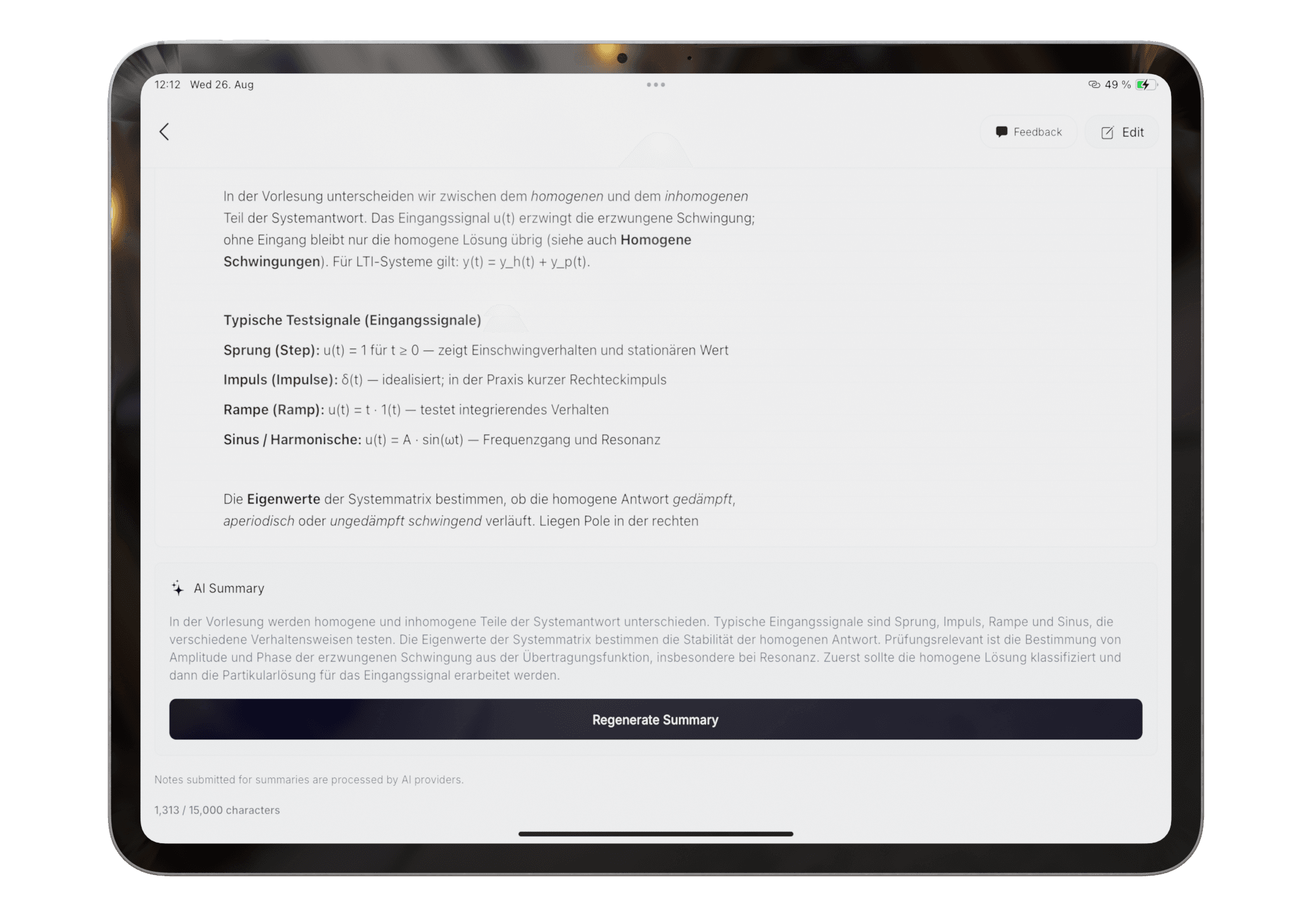
Typed note and its study summary in Pocket Orbit

Checkable output

Study from the summary without losing the source

Pocket Orbit is an active note workflow, not an unattended lecture recorder. The original note remains the reference when the summary needs verification.

  • Review names, formulas, and definitions
  • Use summaries as study aids rather than source replacements
  • Return to the original note when context matters
Read the exact help steps
Study summary shown beneath its note context
Questions

Frequently asked questions

Does Pocket Orbit record lectures?

Pocket Orbit is positioned around notes you actively type, scan, or draw. It is not presented as an unattended meeting or lecture transcription service.

Should I trust every AI summary?

No. Check important facts, names, formulas, and definitions against the source note.

Editorial trust

Sources, method, and update policy

Product claims are checked against the current app. Competitor claims use dated official sources. Corrections can be sent to alpaca-labs.dev@proton.me.

Keep going

for students

Pocket Orbit for Students

Type, scan, or handwrite class notes on iPad, then organize and summarize the material you need to study.

Read for students

feature

Apple Pencil Note-Taking App for Handwritten Notes

Handwrite notes on iPad with Apple Pencil, then review, recognize, organize, study, or export them in Pocket Orbit.

Read feature

feature

Automatic Note Organization for Messy Class Notes

Turn mixed class notes into suggested groups and summaries without building a complex folder system first.

Read feature

help

Create and Review an AI Note Summary

Generate a summary from reviewed notes and check it against the original material.

Read help

Try the Type, Scan, and Draw workflow

Download Pocket Orbit from the App Store, then use the linked help articles to test it with your own notes.

Download Pocket Orbit on the App Store